
KNOWLEDGE BASE · PurrOS & SimHub · PurrOS & SimHub
PurrForce haptics in SimHub — setup
PurrOS 2.0 includes native PurrForce control — the steps below cover the SimHub path, which remains fully supported.
- PurrOS · all products
- Updated 6 Sep 2026
PurrOS 2.0 includes native PurrForce control — the steps below cover the SimHub path, which remains fully supported.
- Download the official profile from fatblackcat.io/downloads (optimised for iRacing, ACC, Le Mans Ultimate), unzip it.
- In SimHub, import it in the ShakeIt Bass Shakers tab (not ShakeIt Motors).
- Go to Sound Output and assign PurrForce HC BRK (brake) and PurrForce HC T/C (throttle/clutch).
- Tune per-effect frequency and intensity in the effects profile — ABS, wheel slip/traction loss, road texture, RPM. Add your own effects freely.
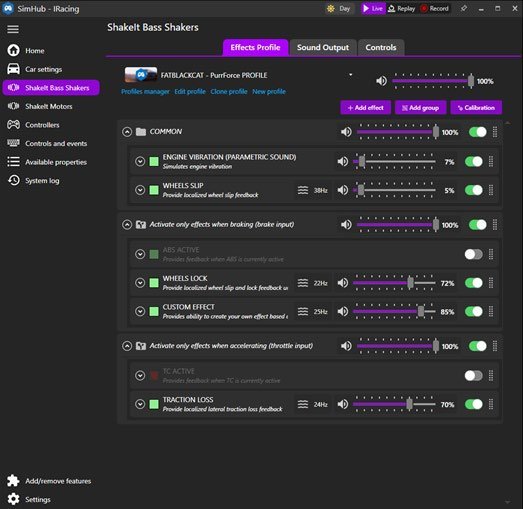
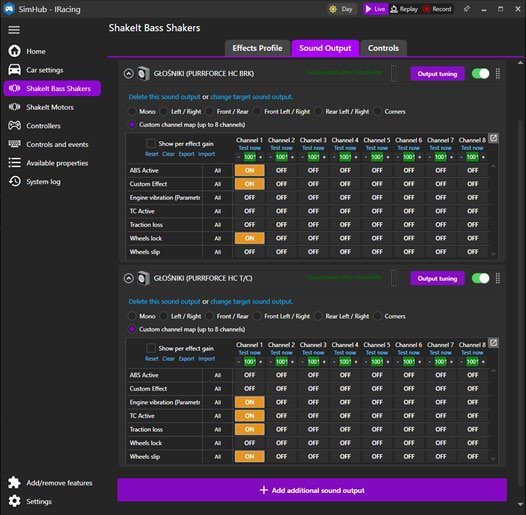
Licensed SimHub requiredThe free SimHub limits effects to ~15 fps, adding delay that ruins the feel. Always use the licensed version.
No SimHub?iRacing users can drive the haptics through iRacing’s LFE output instead — but iRacing supports only ONE device at a time, so only one pedal gets effects. SimHub is the recommended path.
Haptics dropped out? If PurrForce goes quiet — often after a Windows update — open Sound Output in SimHub, click change target sound output and re-select the device. Windows sometimes reshuffles USB port IDs, so SimHub loses track of the haptics motor and just needs re-pointing. It is not a hardware fault.
WAS THIS HELPFUL?
STILL STUCK?
Talk to us
A human answers, usually within minutes. Your question reaches the people who designed and assembled the pedals.