
KNOWLEDGE BASE · PurrOS & SimHub · PurrOS & SimHub
PurrForce haptics in SimHub — setup
PurrOS 2.0 includes native PurrForce control for iRacing, an early alpha release: see PurrForce control in PurrOS. The steps below cover the SimHub path, which remains fully supported, including for sims that PurrForce control does not cover.
- PurrOS · all products
- Updated 25 Oct 2026
PurrOS 2.0 includes native PurrForce control for iRacing, an early alpha release: see PurrForce control in PurrOS. The steps below cover the SimHub path, which remains fully supported, including for sims that PurrForce control does not cover.
The profile works for PurrPRO FORMULA PEDALS and PurrPRO GT PEDALS.
Use either SimHub or PurrForce control in PurrOS for your haptics, not both at the same time.
- Download the official profile from fatblackcat.io/downloads (optimised for iRacing, ACC, Le Mans Ultimate), unzip it.
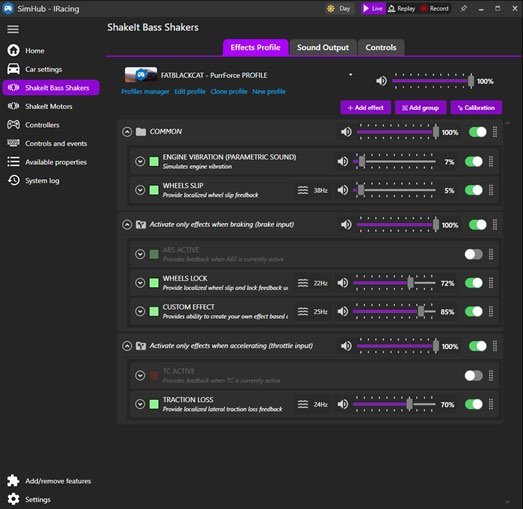
- In SimHub, import it in the ShakeIt Bass Shakers tab (not ShakeIt Motors).
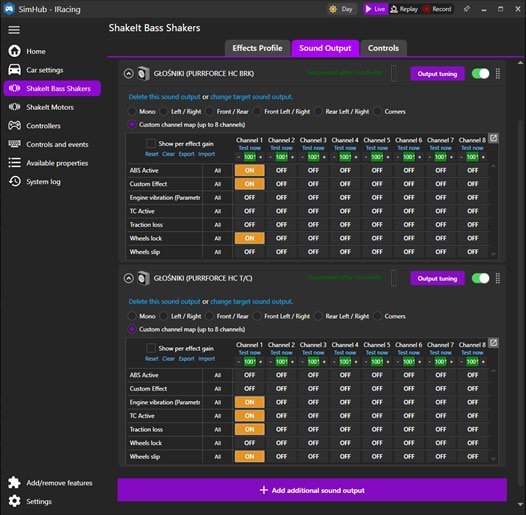
- Go to Sound Output and assign PurrForce HC BRK (brake) and PurrForce HC T/C (throttle/clutch).
- Tune per-effect frequency and intensity in the effects profile — ABS, brake threshold, traction loss, engine RPM. Add your own effects freely.
Licensed SimHub requiredThe free version of SimHub adds a lot of delay to the effects, so they will not feel right while driving. Always use the licensed version.
No SimHub?In iRacing you can use PurrForce control in PurrOS instead, with no SimHub. iRacing’s LFE output also works, but iRacing supports only ONE device at a time, so only one pedal gets effects. For every other sim, SimHub is the recommended path.
Haptics dropped out? If PurrForce goes quiet — often after a Windows update — open Sound Output in SimHub, click change target sound output and re-select the device. Windows sometimes reshuffles USB port IDs, so SimHub loses track of the haptics motor and just needs re-pointing. It is not a hardware fault.
WAS THIS HELPFUL?
STILL STUCK?
Talk to us
A human answers, usually within minutes. Your question reaches the people who designed and assembled the pedals.