
KNOWLEDGE BASE · Setup & adjustment · Connecting & calibration
Calibration in PurrOS — step by step
Download PurrOS from fatblackcat.io/downloads and install.Open the Pedals tab → you'll see Clutch / Brake / Throttle sections (clutch inactive until…
- PurrPRO FORMULA PEDALS
- Updated 6 Sep 2026
- Download PurrOS from fatblackcat.io/downloads and install.
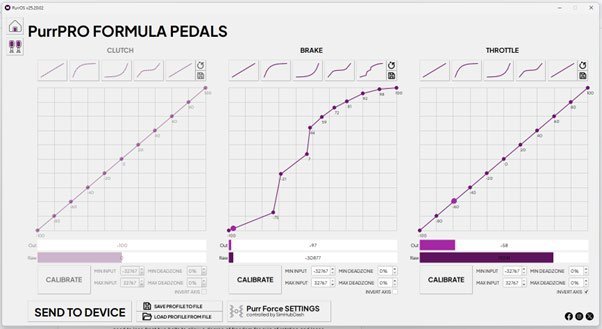
- Open the Pedals tab → you’ll see Clutch / Brake / Throttle sections (clutch inactive until the clutch pedal ships).
- Click CALIBRATE, press and release the pedal fully, then STOP & SAVE.
- Set MIN and MAX deadzones to taste.
- Click SEND TO DEVICE. In PurrOS 2.0 there is no confirmation sound or pop-up — settings go live to the pedals instantly (1.0 used to fully reset the pedals on each send; 2.0 doesn’t).
Heel off for calibrationBecause the heel rest is active and your leg has weight, don’t rest your heel on the A.H.S during calibration — press using the pedal face only.
Set-and-forgetCalibration lives on the pedal’s chip. You can close PurrOS entirely while racing. Pedal characteristics (curves) can be shaped by dragging points on the graph or using predefined curves, and saved as profiles per sim or car.
WAS THIS HELPFUL?
STILL STUCK?
Talk to us
A human answers, usually within minutes. Your question reaches the people who designed and assembled the pedals.